
Andy Thierauf: Ableton Live as an Instrument
Andy Thierauf: Ableton Live as an Instrument
A Musician-Centered Introduction to MIDI and Music Technology
by Javi Garza
Percussive Notes
Volume 64
No. 5
October
2026
Andy Thierauf’s PASIC 2026 session focuses on making music technology accessible to musicians by translating technical audio engineering terms into familiar musical language. He emphasizes that understanding concepts like gain, frequency, and signal processing from a musical perspective helps break down barriers to electronic music. Andy advocates starting with MIDI to create backing tracks and encourages patience and consistent practice, comparing learning a DAW to practicing a musical instrument. His approach is collaborative and practical, aiming to inspire musicians to explore electronic music creatively, regardless of their technical background. The session also addresses common misconceptions, emphasizing that acoustic and electronic music are fundamentally the same—both involve sound waves—and encourages percussionists to embrace technology without fear.
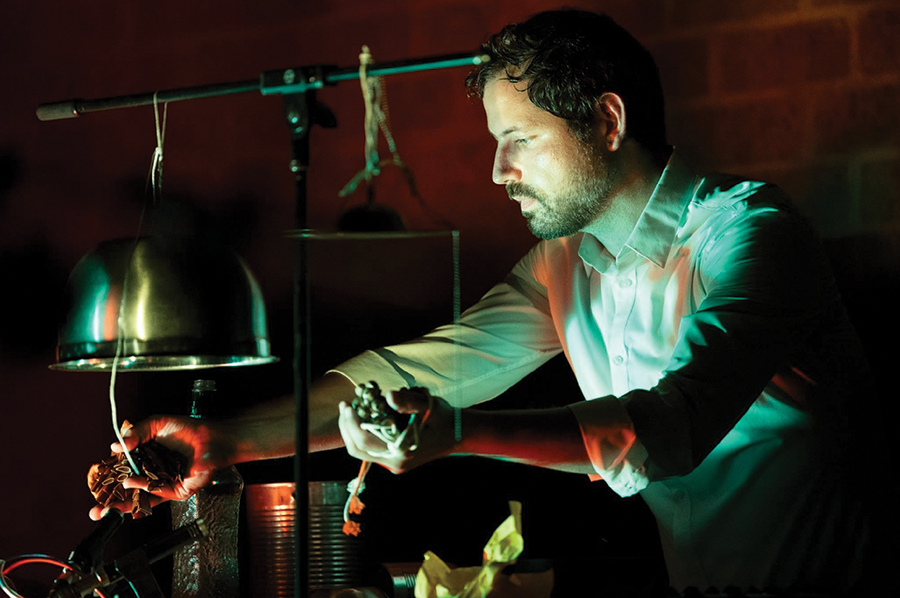
Dr. Andy Thierauf is a Philadelphia-based percussionist specializing in the creation and performance of contemporary music. As a performer, he has appeared across the country at music festivals, conferences, and symposiums, including PASIC. Dr. Thierauf’s creative research centers on seamlessly integrating technology and performance to produce collaborative multimedia presentations with writers, dancers, actors, choreographers, and composers. Recently, I spoke with Dr. Thierauf about his PASIC 2026 session.
Javi Garza: Your PASIC presentation is virtual, which is pretty fitting for an electronic music session. Without giving too much away, can you give us a preview of what you will cover?
Andy Thierauf: I think the title gives it away. We’re going to be focusing on Ableton. At Kutztown, I teach a class that’s an introduction to music technology, and that’s what inspired me to make this presentation.
What really works in the class is bringing this music technology and translating the “audiospeak” into actual musical terms. If you talk to audio engineers, they’ll talk “frequency” and “amplitude” and “phase.” However, those terms may not mean that much to a musician. What’s really helpful is being able to translate some of the terms and these ideas from audio language into musical language so that we have this common language.
If you’re a musician coming at it for the first time, a lot of things in Ableton or other digital audio workstations aren’t necessarily using words from a music background. They’re from an audio engineering background. If we have an understanding of terms like “gain,” then we can understand a lot more about signal processing in a DAW. Even the term “signal processing” may not mean anything to someone who hasn’t worked with electronics before. But knowing that the signal is just the sound that we’re getting, and processing is just manipulating it in some way, we can start to understand what signal processing is from a musician’s standpoint. We can have this language that breaks down the barrier.
I think anyone can make electronic music. If you have a laptop, it’s just a matter of getting in there. We have to wear a number of different hats in our field. We have to wear our musician’s hat, so that comes first if we’re primarily a musician practicing acoustic music. Then, we have to wear the audio engineering hat if we’re recording ourselves. We have to learn a little bit more about microphones, signal, gain staging, and things like that.
Hopefully, this session will even all that out and give the participants and the audience a stepping stone to get into it and understand what we’re doing. We can’t talk about everything — it’s only one session — but it will offer ways to get your foot in the door. From there, you’ll be able to explore more.
Garza: Walk us through a typical setup that you would start one of your students in, versus an example of your professional use of Ableton.
Thierauf: It depends somewhat on the student and to what resources the student has available. If a student doesn’t have Ableton but has something else, like Logic Pro or GarageBand, we can start there. I don’t worry about recording things at first. I like to just dive into MIDI because it’s the easiest way to start making music right away. We can talk about the basics of how we enter notes, and then we can see the timeline and identify things like tick lines, which represent subdivisions like sixteenth notes. So now we can figure out the rhythm. It looks different from traditionally notated music, but you can start to figure out what that starts to look like in a MIDI note.
I really like to have students create little backing tracks for their études. An étude may have its challenges. Adding a backing track may help the student make it a little bit more musical and put a little melody in there. Also, you can start MIDI tracks at a slower tempo, then work your way up. It’s a great practice technique that can be applicable to what the student is doing, regardless of age or experience level. If the student has access to a computer and a digital audio workstation, you can get them going. When students have that ability to be creative, you can see the fire light up in their eyes, and they discover that they can make nearly anything they want.
In my own work process, it depends on the project. For example, I have a big project with some dancers this fall. We’ve had some rehearsals, and I usually have Ableton up. I use a MIDI keyboard for some things, but I also have a vibraphone and other instruments, so I’ll have a microphone set up. I’ll record whatever I’m doing as I improvise, watching the dancers and recording what I do. The first rehearsal might not include very much actual technology; it may just involve recording what we’re doing.
In subsequent rehearsals, I can offer more set ideas and recordings to play. I like to give the dancers plenty of options. It’s a very collaborative process, which I really enjoy. In some dance projects, you have to create the music first, and then the dancers choreograph to that music. But in this situation, we’re making it together. I can create music in response to their choreography and gestures, and Ableton really facilitates that type of creative process. You can’t be too precious about anything. You just have to throw things out there and see what works.
Garza: Are there any core philosophies that guide this presentation?
Thierauf: You want to understand that it is a process, which will take time. You have to be patient with yourself. There are going to be some frustrations along the way, and that’s okay. My philosophy as a teacher is to show the clearest path forward. I want to make it as easy as possible to follow that path, so that you can master it yourself. But I want to lay it clearly and offer as much help as possible.
Garza: Would you consider the path to fluency in electronic music similar to learning an instrument?
Thierauf: It’s just like doing George Hamilton Green exercises on the xylophone. It’s not anything that you’re going to present in a concert, but you go through the process, and you get those chops. You get more familiar with the software, whatever it is. It’s just a matter of spending time. Like spending time with exercises on an instrument, it’s the same thing with electronic music. Just open up a project every day and try to make something. It doesn’t have to be anything great. You may delete it in the end, but that’s okay. It’s a matter of going through that process and “making friends” with the DAW.
Garza: That’s well put: just hang out with it and learn to not be afraid of it. What are some key takeaways you want your audience to have?
Thierauf: I definitely want the audience to have an understanding of the lingo — connecting some of the key terms and phrases in audio engineering to their musical analogs. For example, gain and amplitude are like dynamics. Frequency is like pitch and intonation. It’s still all music, so we’re talking about the same things. We just need the translation from the engineering language to the musical language. Hopefully, that will give the audience the impetus to go into whatever digital audio workstation they might have available and start making sense of it.
Garza: What were some of the conceptual or technical challenges in developing this material?
Thierauf: Breaking down the material conceptually was the biggest challenge. I don’t want it to be tedious, but I want it to really be engaging, and I want to make sure that the audience has the ability to take it in. I really want to set it up so that the steps make clear sense. Some aspects of a program like Ableton are intuitive, but there are a lot of parts of the program that aren’t intuitive.Generally, I think that’s an important part of pedagogy — figuring out the best way to teach something. How do you make it as obvious as possible from one step to the next? It is a challenge with electronic music. There’s so much that programs like Ableton, Logic, and Pro Tools can do. There are so many little knobs and buttons and everything that it can be overwhelming. It’s a matter of starting with the fundamental components.
Garza: Are there any misconceptions you often encounter about electronic music in the progression?
Thierauf: I think the biggest misconception is that there’s a difference between acoustic music and electronic music. There’s really not. It’s all sound waves. It’s just how we interact with it. If you haven’t worked with electronic music before, or if you haven’t done any recording, it can be very confusing. Just looking at a mixer, many of the function control names are abbreviated, so it can be a totally different language. It can be very intimidating at first. I don’t like to think of it as “this is music” or “this is electronic.” We’re still trying to find the right sound. I think percussionists are particularly attuned to that because we’re always dealing with sound effects and things like that, so I think we’re more attuned to honing in on sound, whether it’s acoustic or electronic.
Garza: What advice would you give percussionists who want to dive into electronic performance but feel intimidated by the tech side of it?
Thierauf: Just try it. When I don’t know how to do something in this realm, I Google it. What you can’t find through Google is inspiration. But what you can do is listen to things. I recommend that people try to copy something as a first step. If you haven’t done any kind of electronic music before, just listen to whatever your favorite song is and try to copy a drum part. Record yourself playing drums and see if you can make yourself sound like the recording, or just use the tools in the program. Copying is a great place to start with anything, because especially if you’re listening to commercial recordings, it’s really important to have a sound goal in mind, and then you can work toward it. Just find something that you like.
Garza: How do you hope this presentation contributes to the broader percussion community?
Thierauf: I hope it offers a stepping stone to get into electronic music. We have so many fundamental sessions that are great stepping stones in timpani, snare drum, and marimba, and so I hope this provides a good foundation for getting into electronic music.
Garza: Where can people follow your work or continue the conversation afterward?
Thierauf: People can find me on Instagram: @andythierauf.
Garza: Any final thoughts?
Thierauf: I think the most important thing is that it is a fundamental session for anyone — even folks who are already well-versed in technology. This is another way that I teach, and I’m hoping that it offers some insight into pedagogy.